Task Flow to create a Project task
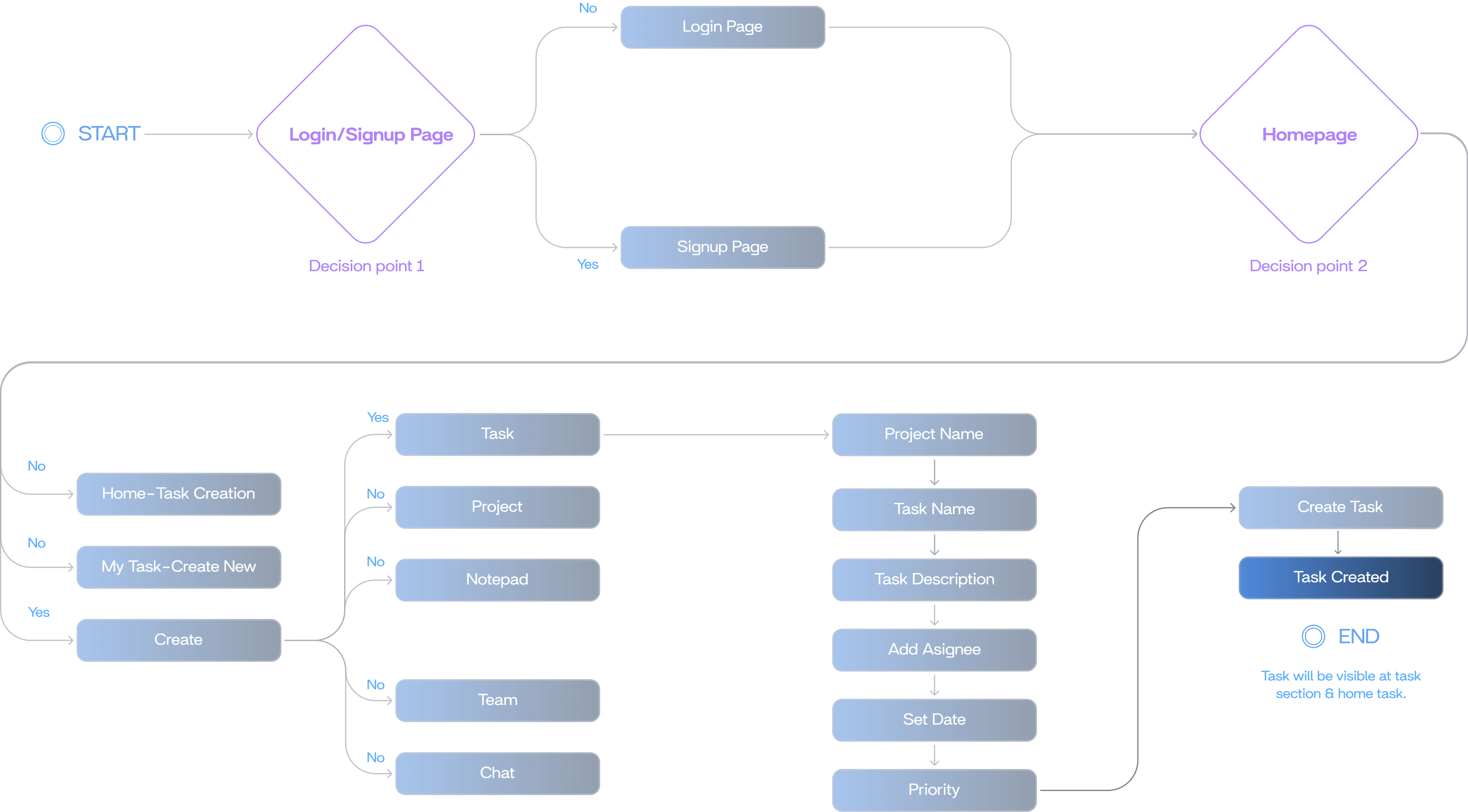
Task Flow to create a Project task
Task Flow to create a Project task


4. Problem statement
4. Problem statement
Project management in complex organizations is hindered by fragmented tools, manual tracking, and limited visibility into progress. This leads to inefficiencies, delays, and poor collaboration, highlighting the need for a unified platform that simplifies workflows and improves real-time visibility.
Project management in complex organizations is hindered by fragmented tools, manual tracking, and limited visibility into progress. This leads to inefficiencies, delays, and poor collaboration, highlighting the need for a unified platform that simplifies workflows and improves real-time visibility.
4. Problem statement
Project management in complex organizations is hindered by fragmented tools, manual tracking, and limited visibility into progress. This leads to inefficiencies, delays, and poor collaboration, highlighting the need for a unified platform that simplifies workflows and improves real-time visibility.
2. Current government project management structure
2. Current government project management structure
Research revealed that the Government of India uses multiple monitoring systems and administrative processes to track projects across ministries rather than a single unified tool.
Research revealed that the Government of India uses multiple monitoring systems and administrative processes to track projects across ministries rather than a single unified tool.
Central Monitoring System
Central Monitoring System
Department Monitoring Portals
Department Monitoring Portals
Administrative Workflow Steps
Administrative Workflow Steps
Digital Governance Platform
Digital Governance Platform
4
4
Key Elements Identified
6
6
Key Elements Identified
4
4
Key Elements Identified
4
4
Key Elements Identified
Key Elements Identified
2. Current government project management structure
Research revealed that the Government of India uses multiple monitoring systems and administrative processes to track projects across ministries rather than a single unified tool.
Central Monitoring System
Department Monitoring Portals
Administrative Workflow Steps
Digital Governance Platform
4
Key Elements Identified
6
Key Elements Identified
4
Key Elements Identified
4
Key Elements Identified
Understand how teams plan, manage, and track projects in structured organizations.
Identify common project workflows and task management practices.
Study how teams collaborate and monitor project progress.
Discover user needs, workflow gaps, and opportunities to improve project visibility and coordination through Workly.
Understand how teams plan, manage, and track projects in structured organizations.
Identify common project workflows and task management practices.
Study how teams collaborate and monitor project progress.
Discover user needs, workflow gaps, and opportunities to improve project visibility and coordination through Workly.
Understand how teams plan, manage, and track projects in structured organizations.
Identify common project workflows and task management practices.
Study how teams collaborate and monitor project progress.
Discover user needs, workflow gaps, and opportunities to improve project visibility and coordination through Workly.
1. Research Objective
1. Research Objective
1. Research Objective
Key Outputs:
Key Outputs:
1. Business & Product Vision
Goal: Streamline Government of India internal workflows via a centralized work management system.
Product Stage: MVP with task management, project tracking, approvals, collaboration, and AI features.
Success Metrics: MVP with task management, project tracking, approvals, collaboration, and AI features.
2. Target Users & Audience
Primary Users: Government project managers, officers, and team members.
Target Industry: Government of India departments and public sector teams.
Typical Team Size: Small to mid-sized departmental teams.
3. Problem Discovery
Inefficient Workflows: Manual approvals, scattered updates, and unclear task ownership.
Time Loss: Tracking project status across multiple channels and reports.
Competitor Gaps: Complex interfaces and lack of government-specific workflows.
4. Core Features & Functional Requirements
MVP Features: Task management, project tracking, approvals, collaboration, notifications, and AI integration.
Project Support: Multiple projects and departmental teams.
Collaboration: Task comments, updates, and team coordination.
5. Technical Constraints
Platform: Mobile-first with web support.
Constraints: High security, reliability, and performance.
Integrations: Future support for enterprise tools and services.
6. Product Timeline & Stakeholder Alignment
Launch Timeline: Phased MVP launch with iterative improvements.
Project Milestones: Research, design, development, testing, and release.
Key Stakeholders: Product managers, CTO, design, and engineering teams.
Key Outputs:
1. Business & Product Vision
Goal: Streamline Government of India internal workflows via a centralized work management system.
Product Stage: MVP with task management, project tracking, approvals, collaboration, and AI features.
Success Metrics: MVP with task management, project tracking, approvals, collaboration, and AI features.
2. Target Users & Audience
Primary Users: Government project managers, officers, and team members.
Target Industry: Government of India departments and public sector teams.
Typical Team Size: Small to mid-sized departmental teams.
3. Problem Discovery
Inefficient Workflows: Manual approvals, scattered updates, and unclear task ownership.
Time Loss: Tracking project status across multiple channels and reports.
Competitor Gaps: Complex interfaces and lack of government-specific workflows.
4. Core Features & Functional Requirements
MVP Features: Task management, project tracking, approvals, collaboration, notifications, and AI integration.
Project Support: Multiple projects and departmental teams.
Collaboration: Task comments, updates, and team coordination.
5. Technical Constraints
Platform: Mobile-first with web support.
Constraints: High security, reliability, and performance.
Integrations: Future support for enterprise tools and services.
6. Product Timeline & Stakeholder Alignment
Launch Timeline: Phased MVP launch with iterative improvements.
Project Milestones: Research, design, development, testing, and release.
Key Stakeholders: Product managers, CTO, design, and engineering teams.
Connect to Content
Add layers or components to swipe between.
1. Business & Product Vision
Goal: Streamline Government of India internal workflows via a centralized work management system.
Product Stage: MVP with task management, project tracking, approvals, collaboration, and AI features.
Success Metrics: MVP with task management, project tracking, approvals, collaboration, and AI features.
1. Business & Product Vision
Goal: Streamline Government of India internal workflows via a centralized work management system.
Product Stage: MVP with task management, project tracking, approvals, collaboration, and AI features.
Success Metrics: MVP with task management, project tracking, approvals, collaboration, and AI features.
1. Business & Product Vision
Goal: Streamline Government of India internal workflows via a centralized work management system.
Product Stage: MVP with task management, project tracking, approvals, collaboration, and AI features.
Success Metrics: MVP with task management, project tracking, approvals, collaboration, and AI features.
Brief, Alignment & Requirement
Discovery
Brief, Alignment & Requirement
Discovery
Brief, Alignment & Requirement
Discovery
STEP - 1
STEP - 1
STEP - 1
Product &
Domain Research
Product &
Domain Research
Product &
Domain Research
STEP - 2
STEP - 2
STEP - 2
Competitive
Analysis
Competitive
Analysis
Competitive
Analysis
STEP - 3
STEP - 3
STEP - 3
UX & UI Design
UX & UI Design
UX & UI Design
STEP - 4
STEP - 4
STEP - 4
Internal
Usability Testing
& Refinement
Internal
Usability Testing
& Refinement
Internal
Usability Testing
& Refinement
STEP - 5
STEP - 5
STEP - 5
Final Design Delivery
Final Design Delivery
Final Design Delivery
STEP - 6
STEP - 6
STEP - 6
The Process We Follow
(Mobile App)
The Process We Follow
(Mobile App)
The Process We Follow
(Mobile App)

Workly
Workly
Workly
"The AI-powered project management platform that assigns,
assists, and accelerates teamwork with intelligent super agent
for every department."
"The AI-powered project management platform that assigns,
assists, and accelerates teamwork with intelligent super agent
for every department."
"The AI-powered project management platform that assigns,
assists, and accelerates teamwork with intelligent super agent
for every department."
Role:
Role:
Role:
Ui/Ux Designer
(with strong UX ownership)
Ui/Ux Designer
(with strong UX ownership)
Ui/Ux Designer
(with strong UX ownership)
Year:
Year:
Year:
2025-2026
2025-2026
2025-2026
Industry:
Industry:
Industry:
SaaS
SaaS
SaaS
Design Team:
Design Team:
Design Team:
Ui/Ux designer x2
Ui designer x1
Ui/Ux designer x2
Ui designer x1
Ui/Ux designer x2
Ui designer x1
Tools:
Tools:
Tools:
Figma, Miro, After Effects
Figma, Miro, After Effects
Figma, Miro, After Effects
Workly Overview
Workly Overview
Workly Overview
Workly is an AI-powered project management tool that goes beyond task tracking
to actively optimize organizational workflows. By deploying customized AI agents
for every department, it automates repetitive tasks, provides real-time
insights, and intelligently assigns responsibilities.
By merging automation with human collaboration, Workly transforms project
management into a proactive, adaptive, and highly efficient experience.
Workly is an AI-powered project management tool that goes beyond task tracking
to actively optimize organizational workflows. By deploying customized AI agents
for every department, it automates repetitive tasks, provides real-time
insights, and intelligently assigns responsibilities.
By merging automation with human collaboration, Workly transforms project
management into a proactive, adaptive, and highly efficient experience.
Workly is an AI-powered project management tool that goes beyond task tracking
to actively optimize organizational workflows. By deploying customized AI agents
for every department, it automates repetitive tasks, provides real-time
insights, and intelligently assigns responsibilities.
By merging automation with human collaboration, Workly transforms project
management into a proactive, adaptive, and highly efficient experience.
Vikas Sen Portfolio
STEP - 2
STEP - 2
STEP - 2
Product & Domain Research
Product & Domain Research
Product & Domain Research
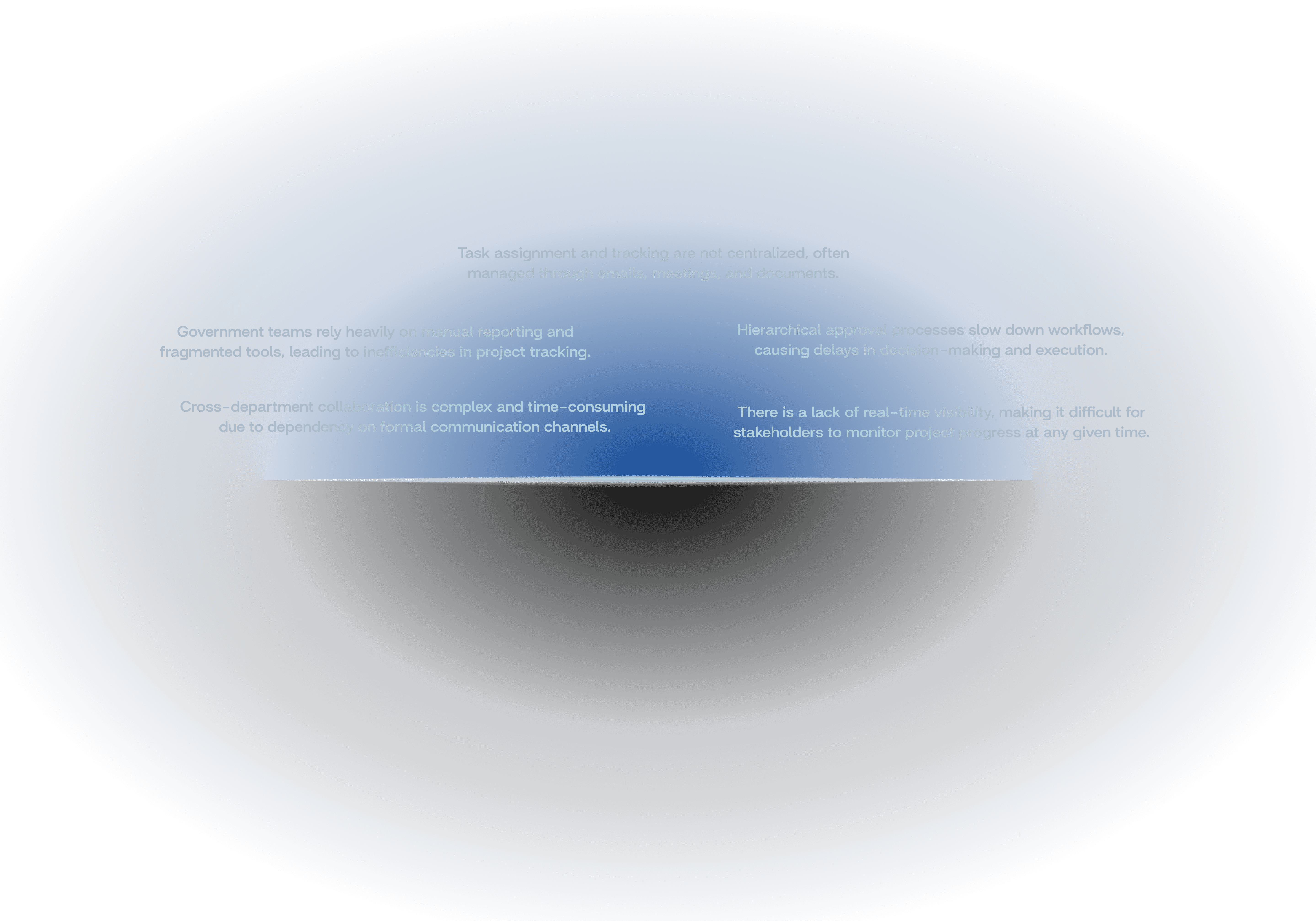
Key insights from User interviews (Government Officials)
Research revealed that the Government of India uses multiple monitoring systems and administrative processes to track
Key insights from User interviews (Government Officials)
Research revealed that the Government of India uses multiple monitoring systems and administrative processes to track
Key insights from User interviews (Government Officials)
Research revealed that the Government of India uses multiple monitoring systems and administrative processes to track


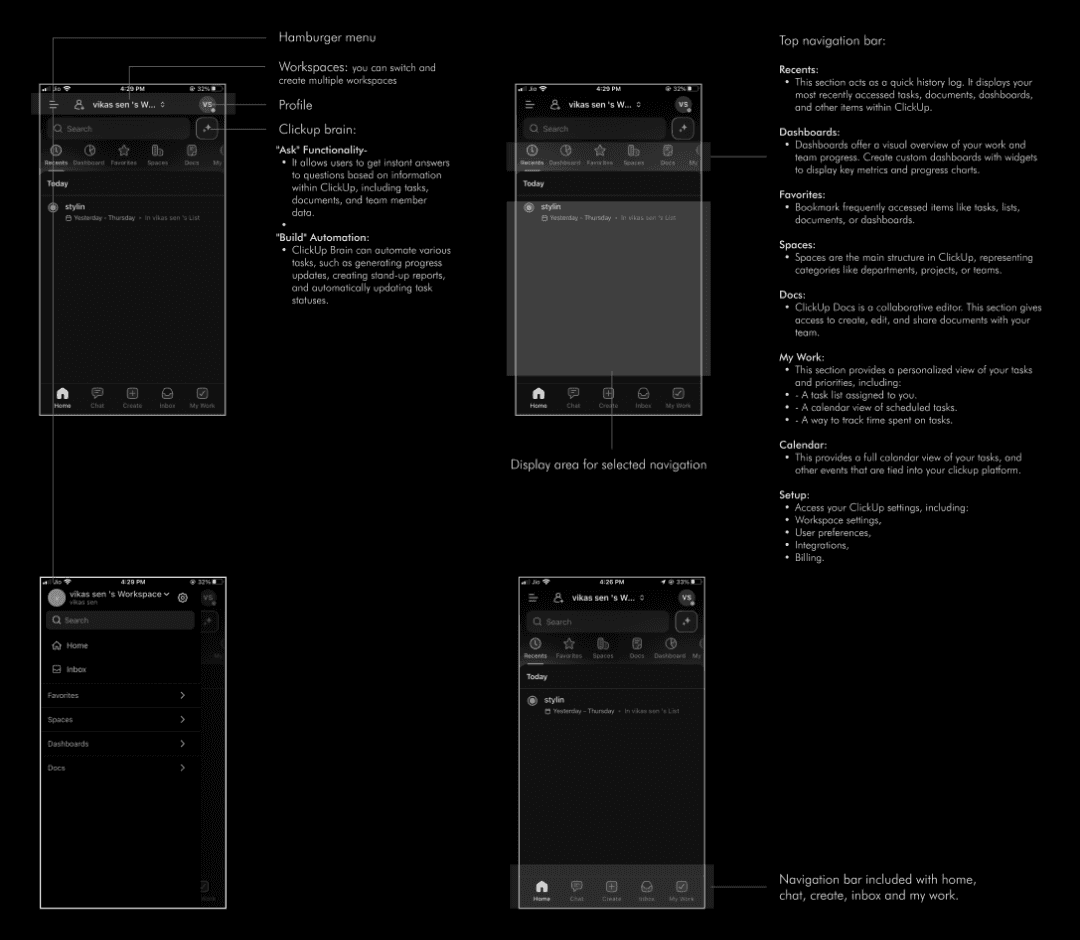

Clickup
ClickUp focuses on being an all-in-one productivity platform with high customization and feature depth.

Asana
Asana focuses on simplicity, usability, and structured workflows for teams.
Product Positioning (Mobile-first perspective)
Aspect
Clickup
Asana
Core Philosophy
All in one productivity hub
Simple, structured work management
Target Users
Power users, complex teams
General teams, startups, beginners
UX Direction
Feature-rich, dense
Clean, focused, minimal
Core Feature Comparison (Mobile Experience)
Features
Clickup
Asana
Customization
Highly customizable
Limited but sufficient
Task Creation
Advanced (custom fields, priorities)
Simple & fast
Task Views
Multiple but limited on mobile
Optimized basic views
Time Tracking
Built-in
Limited / integrations
Collaboration
Real-time + chat-like features
Comments + mentions
Automation
Advanced
Simple and easy to use rules
Strengths & Weaknesses
Strengths
Clickup
Asana
Highly customizable workflows and views
Clean and intuitive UI
Supports complex project structures
Strong project visibility
Offers all-in-one features
Easy-to-use automation
Weaknesses
Steep learning curve
Limited customization compared to ClickUp
Can feel overwhelming and cluttered
May require additional tools for full workflow
Clickup
ClickUp focuses on being an all-in-one productivity platform with high customization and feature depth.
Asana
Asana focuses on simplicity, usability, and structured workflows for teams.
Product Positioning (Mobile-first perspective)
Aspect
Clickup
Asana
Core Philosophy
All in one productivity hub
Simple, structured work management
Target Users
Power users, complex teams
General teams, startups, beginners
UX Direction
Feature-rich, dense
Clean, focused, minimal
Core Feature Comparison (Mobile Experience)
Features
Clickup
Asana
Customization
Highly customizable
Limited but sufficient
Task Creation
Advanced (custom fields, priorities)
Simple & fast
Task Views
Multiple but limited on mobile
Optimized basic views
Time Tracking
Built-in
Limited / integrations
Collaboration
Real-time + chat-like features
Comments + mentions
Automation
Advanced
Simple and easy to use rules
Strengths & Weaknesses
Strengths
Clickup
Asana
Highly customizable workflows and views
Clean and intuitive UI
Supports complex project structures
Strong project visibility
Offers all-in-one features
Easy-to-use automation
Weaknesses
Steep learning curve
Limited customization compared to ClickUp
Can feel overwhelming and cluttered
May require additional tools for full workflow
Clickup
ClickUp focuses on being an all-in-one productivity platform with high customization and feature depth.
Asana
Asana focuses on simplicity, usability, and structured workflows for teams.
Product Positioning (Mobile-first perspective)
Aspect
Clickup
Asana
Core Philosophy
All in one productivity hub
Simple, structured work management
Target Users
Power users, complex teams
General teams, startups, beginners
UX Direction
Feature-rich, dense
Clean, focused, minimal
Core Feature Comparison (Mobile Experience)
Features
Clickup
Asana
Customization
Highly customizable
Limited but sufficient
Task Creation
Advanced (custom fields, priorities)
Simple & fast
Task Views
Multiple but limited on mobile
Optimized basic views
Time Tracking
Built-in
Limited / integrations
Collaboration
Real-time + chat-like features
Comments + mentions
Automation
Advanced
Simple and easy to use rules
Strengths & Weaknesses
Strengths
Clickup
Asana
Highly customizable workflows and views
Clean and intuitive UI
Supports complex project structures
Strong project visibility
Offers all-in-one features
Easy-to-use automation
Weaknesses
Steep learning curve
Limited customization compared to ClickUp
Can feel overwhelming and cluttered
May require additional tools for full workflow

Workly Web App
Workly Web App
Workly Web App
To explore the workly web app experience, click the button below.
To explore the workly web app experience, click the button below.
Social Media Creative
Social Media Creative
Social Media Creative


The design process began with a detailed project brief from the Project Manager and CTO.
This phase focused on understanding the business vision, technical constraints, timelines, and success metrics.
The design process began with a detailed project brief from the Project Manager and CTO.
This phase focused on understanding the business vision, technical constraints, timelines, and success metrics.
After receiving the brief, we conducted multiple deep-dive discussions.
We asked detailed “why, what, and how” questions to uncover real problems, edge cases, and expectations from different departments.
After receiving the brief, we conducted multiple deep-dive discussions.
We asked detailed “why, what, and how” questions to uncover real problems, edge cases, and expectations from different departments.





The design process began with a detailed project brief from the Project Manager and CTO.
This phase focused on understanding the business vision, technical constraints, timelines, and success metrics.
After receiving the brief, we conducted multiple deep-dive discussions.
We asked detailed “why, what, and how” questions to uncover real problems, edge cases, and expectations from different departments.
STEP - 1
STEP - 1
STEP - 1
Brief, Alignment & Requirement Discovery
Brief, Alignment & Requirement Discovery
Brief, Alignment & Requirement Discovery
© Vikas Sen 2026
Designed in framer
Every Big Idea Deserves the Right Design


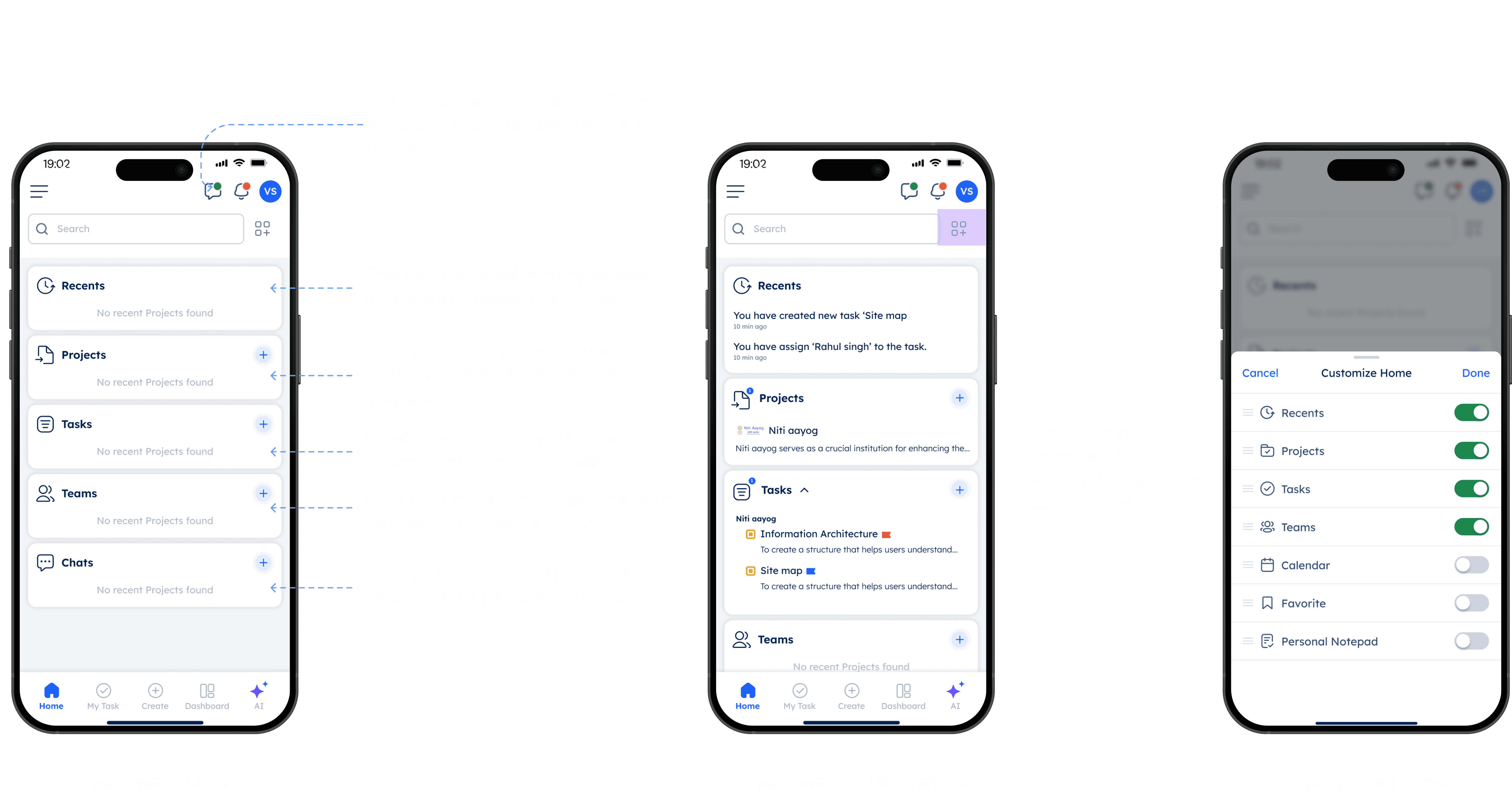

Scroll to explore
Scroll to explore
Vikas Sen Portfolio

User Interface
© Vikas Sen 2026
Designed in framer
Every Big Idea Deserves the Right Design
User Interface
User Interface
© Vikas Sen 2026
Designed in framer
Every Big Idea Deserves the Right Design

STEP - 3
STEP - 3
STEP - 3
Competitive Analysis
Competitive Analysis
Competitive Analysis
STEP - 4
STEP - 4
STEP - 4
UX & UI Design
UX & UI Design
UX & UI Design
Vikas Sen Portfolio
Vikas Sen Portfolio